
How to Play
Three sliding puzzles every day, and one rule for all of them: slide tiles into the gap. Here are the rules, how ranking works and a few tips for faster times.
The rules
- 01
Slide into the gap
One square on the board is empty. Tap a tile next to the gap, or swipe, to slide it in. On a keyboard, use the arrow keys or WASD.
- 02
One ranked try
Your first try at each day's puzzle is ranked. There's no undo, and you can't restart it for a better time.
- 03
Race the clock
The timer starts on your first move and stops when the puzzle is solved. The fastest time wins, and fewer moves break ties.
- 04
See where you placed
When you finish, you'll see your time, your moves and your rank, and you can open the day's leaderboard.
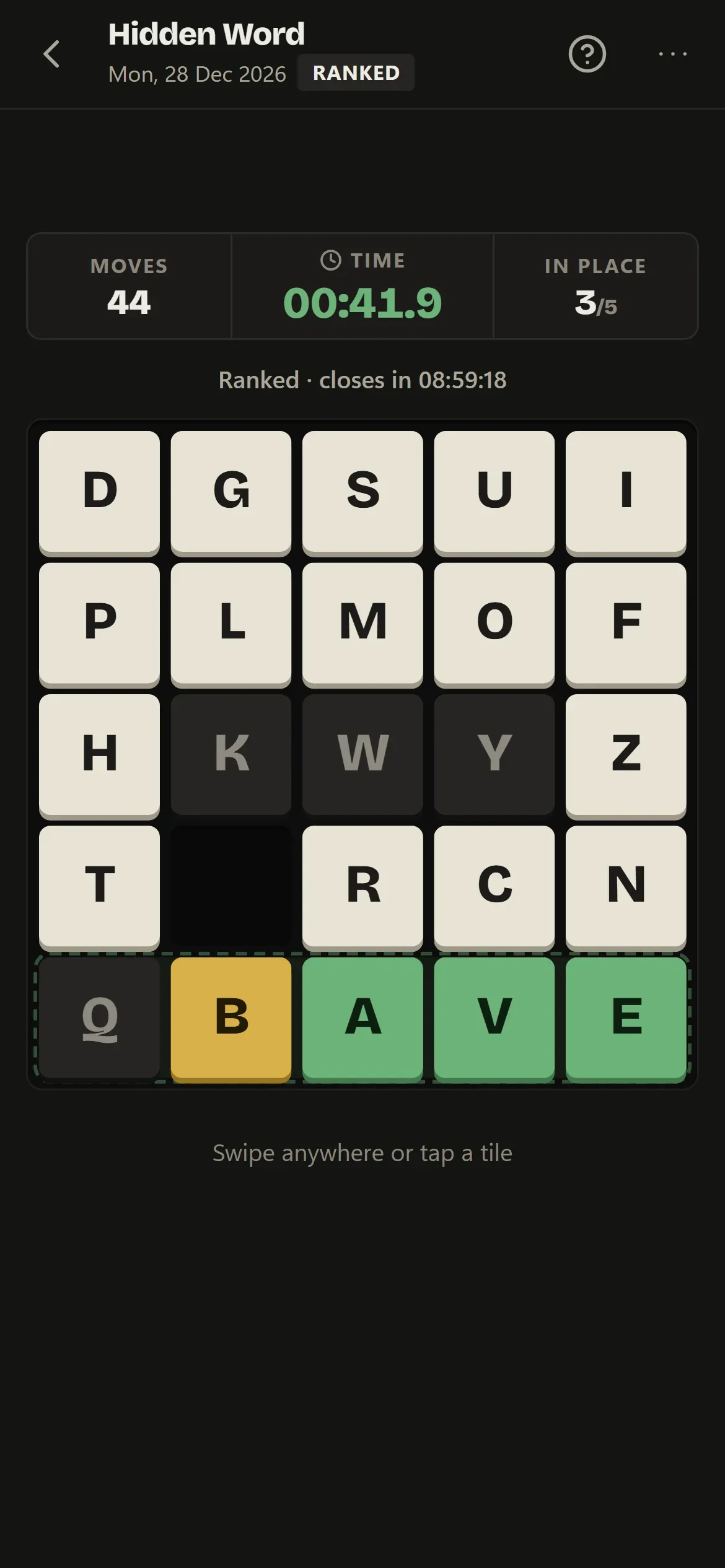
The three puzzles
Hidden Word
A five-letter word is hidden among the 24 letter tiles. Spell it across the bottom row. Letters light up as they enter that row: green means the right spot, yellow means the letter is in the word but somewhere else, and grey means it isn't in the word at all. Use the colours to work out the word, then slide its letters into place.
Classic
The classic sliding puzzle, on a 5 × 5 board. Slide the numbered tiles back into order from 1 to 24, reading left to right and top to bottom, with the gap in the bottom-right corner. Tiles that are already home are marked with a dot.
Picture
An animal silhouette is cut into squares and shuffled. Slide the pieces back until the board matches the small picture at the top, and tap that picture to see it bigger. Pieces that are solid black are interchangeable, and so are solid white ones. There's a new animal every day, from 115 in all.
Tips for faster times
Look before you slide
The timer only starts on your first move. Take a moment to plan, then go.
Solve the top first
In Classic and Picture, finish the top rows one at a time, then the left columns. The last small corner is the trickiest, so keep space to work there.
Slide whole lines
Tap a tile in the same row or column as the gap, even far away, and the whole line slides at once. It saves a lot of moves.
Read the colours
In Hidden Word, the bottom row remembers what it has told you. Yellows show which letters belong, greys rule letters out, and greens are already home.
Use the blank pieces
In Picture, any solid black piece fits any solid black spot, and the same for white. Save your effort for the pieces with edges and detail.
Practise in the archive
In the iOS and Android apps, past puzzles are unranked and have undo, so they're a good way to get faster.
Controls
- Tap a tile next to the gap to slide it in.
- On a phone or tablet, swipe anywhere on the game to slide a tile into the gap.
- Tap a tile further along the gap's row or column to slide the whole line.
- On a keyboard, use the arrow keys or WASD.
Common questions
- When do the puzzles change?
- At midnight UTC, the same moment for everyone, so the whole world races the same three boards on the same day.
- Can I play again after my ranked try?
- Your first try is the one that counts. You can't replay today's ranked puzzles for a better time, but the apps have every past puzzle to practise on.
- What if I close the game in the middle of a puzzle?
- Your progress is saved after every move, so you can pick up where you left off. The ranked timer keeps counting while you're away.
- Why wasn't my result ranked?
- Every ranked result is checked by our servers. A try that isn't finished before the puzzles change at midnight UTC becomes unranked, and so does a result that doesn't pass the check.
- What name appears on the leaderboard?
- An automatic name like SwiftOtter123, unless you choose your own in Settings → Account. Please don't use your real name.
- Is there a colour-blind mode?
- Yes. Turn it on in Settings to add patterns and higher-contrast colours to the Hidden Word feedback.
Ready to try?
Today's three puzzles are free in your browser.
Still stuck? Get help from SlideQuest support.